
In this video we’ll take a look at some of the essential items that make MEE such an incredible learning tool in the classroom.
Watch the video above to find out about essential items.
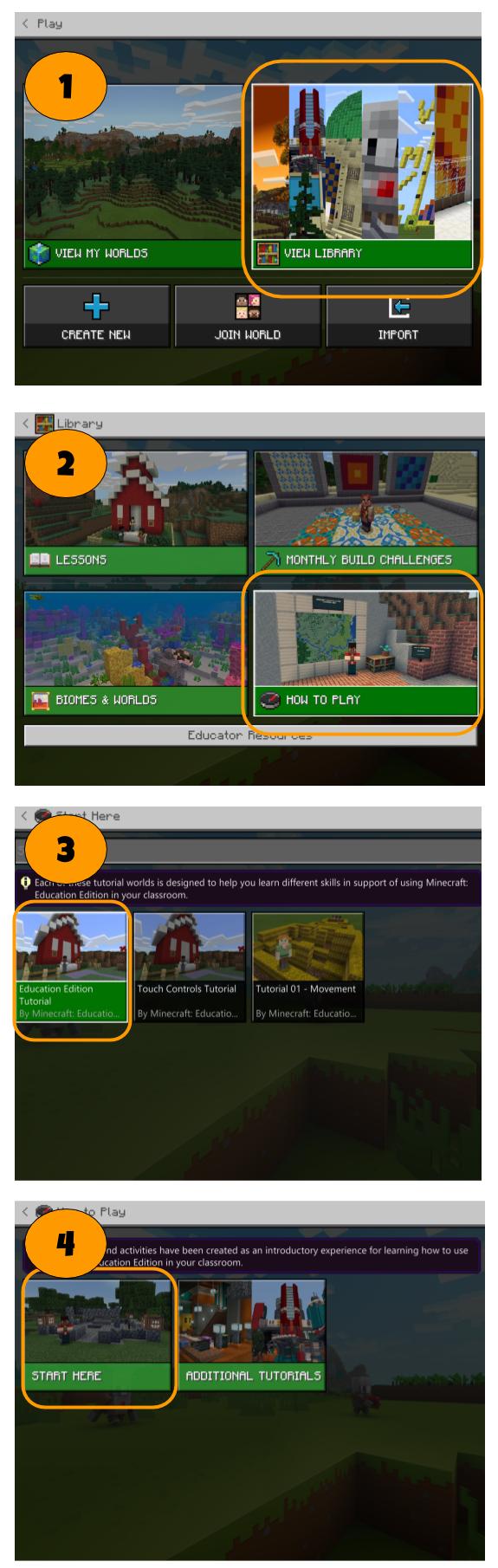
Open the Minecraft Tutorial world by following the steps in the image below. I recommend at least an hour in here to help you practice your skills before moving on. It gets progressively more difficult so this world is great to come back to you when you are ready to learn new skills.
NB: World Builder status must be turned to true for you to edit content for NPC’s. World Builder status allows you to make changes to the world, even if it’s set to immutable world (more on this later). To turn off and on World Builder just type /wb in the chat bar. It’s a boolean operation meaning it’s either true or false, off or on.
An example of when you might want to change World Builder status is when you want to view what your students would from an NPC. You’ll see other reasons why later in the course when we look at Specialty Blocks.